
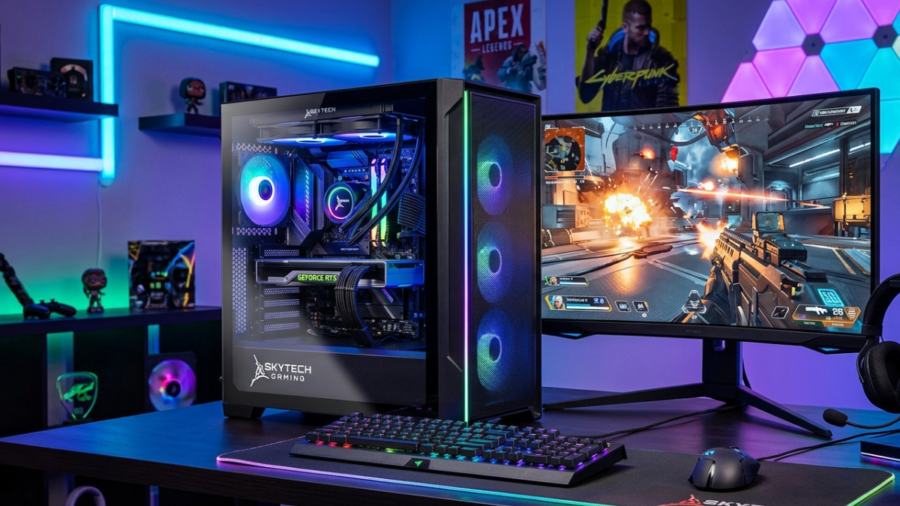
Choosing a gaming PC is not always easy. Buyers have to compare the processor, graphics card, RAM, storage, cooling, case, power supply, price, and upgrade potential before making a decision. Skytech Gaming is one brand that offers prebuilt and custom gaming desktops for people who want a ready-to-use PC without building every component themselves.
It offers systems across different performance levels, from more affordable configurations to high-end gaming PCs. Its official website also provides a custom PC builder, giving buyers more control over their hardware choices. The company says its computers are designed and hand-built in the USA and tested for performance, compatibility, value, and aesthetics.
What Is Skytech Gaming?
It is a company focused on gaming desktop computers. It sells prebuilt gaming PCs as well as custom configurations. According to Skytech Gaming, its builds begin with a budget and then use selected components based on performance, compatibility, value, and appearance.
The company also emphasizes details such as professional cabling, RGB lighting, color coordination, and overall build quality. This makes it relevant to both beginners who want a ready-made computer and experienced users who want a more customized system.
Who Is Skytech Gaming For?
It can be useful for gamers who want a desktop that arrives assembled and ready for setup. It may also appeal to buyers who understand PC hardware but do not want to spend time selecting and installing every component themselves.
The company offers different hardware combinations, so buyers can choose according to their gaming requirements and budget. Its custom-building options can also provide more flexibility than a fixed prebuilt system.
Why Is Skytech Gaming Popular?
One reason it receives attention is the variety of configurations available. Its current catalog includes PCs with different AMD and Intel processors and graphics options from NVIDIA and AMD. The company also focuses on the visual side of gaming desktops, including RGB lighting, glass panels, and different case designs. This gives buyers the opportunity to consider both performance and appearance when choosing a PC.
Skytech Gaming PC Features
The processor and graphics card are two of the most important parts of a gaming PC. They have a major influence on gaming performance and the types of workloads the system can handle. It sells systems with processors from AMD and Intel and graphics cards from NVIDIA and AMD.
Current examples include configurations built around Intel Core processors, AMD Ryzen processors, NVIDIA GeForce RTX graphics cards, and AMD Radeon graphics. When comparing it PCs, buyers should focus on the exact CPU and GPU instead of choosing based only on the brand or model name.
RAM and Storage
RAM and storage also differ between it models. Current configurations can include 16GB or 32GB of memory, while some systems offer higher capacities. Storage also varies. Examples from current Skytech listings include 500GB, 1TB, and larger NVMe storage configurations. Before buying, check the exact product specification because two it PCs can have very different RAM and storage configurations.
Cooling and Airflow
Gaming PCs need an effective cooling setup because demanding workloads can produce significant heat. It uses different cooling solutions depending on the model. Current systems can include tower coolers, liquid cooling, and multiple case fans. For example, a current Shadow 4 configuration lists a 360mm AIO cooler and four fans. Cooling should therefore be considered alongside the CPU, GPU, case, and fan configuration rather than as an isolated feature.
Build Quality and Design
It places emphasis on both appearance and construction. The company says it focuses on high build quality, professional cabling, RGB lighting, and consistent designs. Different cases provide different styles, so buyers can select a system that fits their desk setup and personal preferences.
Best Skytech Gaming PCs
There is no single it PC that is automatically best for every buyer. The ideal model depends on your budget, games, resolution, and other workloads.
Best PC for Beginners
Beginners should focus on finding a balanced system rather than automatically choosing the most expensive option. For example, Skytech currently lists systems using hardware such as Intel Core i5 processors, RTX 5060 Ti graphics, 16GB or more of RAM, and NVMe storage. Exact configurations and availability can change.
Best PC for 1080p Gaming
For 1080p gaming, the graphics card and processor should be matched to the games and settings you intend to use. Skytech’s current lineup includes graphics options such as the RTX 5060 Ti, giving buyers access to modern hardware without necessarily moving into the company’s most expensive systems. Instead of promising a specific FPS number, buyers should check independent benchmarks for the exact CPU and GPU combination.
Best PC for 1440p Gaming
1440p gaming generally places greater rendering demands on the graphics card, making GPU selection especially important. Skytech offers higher-performance configurations with graphics hardware such as the RTX 5070 Ti and other higher-tier GPUs. For example, a current King 95 configuration uses an RTX 5070 Ti 16GB with an Intel Core Ultra 7 processor and 32GB of memory.
Best High-End Gaming PC
High-end buyers can look at it systems equipped with premium processors and graphics cards. Current Skytech listings include systems using powerful NVIDIA RTX graphics cards and high-end AMD or Intel processors. These configurations are designed for buyers seeking more performance and are generally more expensive than entry-level systems.
Skytech Gaming Performance
Gaming Performance and FPS
Gaming performance depends primarily on the hardware configuration inside the PC. A it system with a powerful GPU and CPU will have different performance characteristics from a more affordable model.
FPS also depends on the game, resolution, graphics settings, drivers, and other system variables. For this reason, it is better to compare the exact hardware configuration with reliable benchmarks than to use one FPS figure for the entire it brand.
Performance in Popular Games
Different games have different hardware requirements. Competitive games may prioritize high frame rates, while graphically demanding games can place greater pressure on the GPU. When choosing a it PC, look at the recommended hardware for the games you play and compare it with the computer’s CPU and GPU.
Streaming and Multitasking Performance
Streaming, recording gameplay, video editing, and multitasking can require more resources than basic gaming. For these workloads, buyers should consider a stronger processor, sufficient RAM, fast storage, and an appropriate graphics card. Skytech offers configurations with higher-end CPUs and 32GB or more of memory for users who need additional system resources.
Skytech Gaming Design and Build Quality
Case Design and RGB Lighting
Case design is one area where it provides plenty of variety. The company’s systems can feature tempered-glass panels, RGB lighting, different case shapes, and various cooling layouts. This allows users to choose a computer that matches their preferred gaming setup.
Cooling and Temperature Management
Cooling depends on the particular model and hardware combination. Some Skytech systems use air cooling, while others use larger liquid coolers. Fan quantity and case airflow also differ between configurations. For example, the Shadow 4 configuration listed by Skytech includes a 360mm AIO cooler and four fans.
Upgrade and Expansion Options
Upgrade potential varies from one it PC to another. Potential upgrades can include additional storage, RAM, graphics hardware, or other components, but compatibility depends on the motherboard, case, power supply, available slots, and cooling.
Skytech Gaming Price and Value
What Affects the Price?
The price of a it PC is mainly influenced by its hardware configuration. The CPU, GPU, RAM, storage, motherboard, power supply, cooling system, and case all contribute to the overall value. Higher-end graphics cards and processors naturally move a system into a higher price category.
Is Skytech Gaming Worth the Money?
It can offer good value when the components and price are well balanced. However, value should be judged on the exact configuration rather than the it name alone. Compare the processor, GPU, memory, storage, cooling, power supply, warranty, and price with competing systems.
Skytech Gaming for Different Budgets
It offers systems across multiple performance levels. Some configurations use more accessible hardware, while others feature premium components designed for demanding gaming and other workloads. Current listings demonstrate this range, with systems using hardware from different CPU and GPU tiers.
| Pros | Cons |
| Wide variety of CPU and GPU configurations | Prices can vary significantly between configurations |
| Offers both prebuilt and custom gaming PCs | Specifications should be checked carefully before buying |
| Multiple RAM and storage options | Some models may be out of stock |
| Different case designs and cooling options | Warranty terms may vary by product and situation |
| PCs are designed and hand-built in the USA, according to Skytech | Custom configurations can cost more depending on selected components |
Potential Drawbacks to Consider
The biggest consideration is that not every it PC offers the same hardware or performance. Buyers need to examine the exact configuration carefully. The return policy also has specific conditions. Skytech currently says new PCs may be eligible for return within 30 days of the invoice date, subject to its requirements, inspection, and applicable deductions.
How to Choose the Right Skytech Gaming PC
Choosing the Right CPU and GPU
Start by identifying the games and applications you want to use. The GPU is particularly important for graphics-heavy gaming, while the CPU affects overall processing performance and can matter more for certain games and productivity tasks.
How Much RAM and Storage Do You Need?
Check the exact RAM and storage configuration before buying. A system with more RAM can be useful for heavier multitasking, while larger storage capacity gives you more room for games and applications. Skytech offers different configurations, so there is no single RAM or storage amount that applies to every model.
Choosing a PC for Your Gaming Resolution
Your monitor resolution should influence your PC choice. A 1080p gamer may have different requirements from someone using a 1440p or higher-resolution display. The graphics card should be selected according to the performance level you want at your chosen resolution.
Considering Future Upgrades
If you plan to upgrade later, check the motherboard, power supply, case space, expansion slots, storage connections, and cooling system. Do not assume that every it PC has identical upgrade options. Reviewing the exact specifications before purchasing can prevent compatibility problems later.
Skytech Gaming vs. Custom-Built PCs
The biggest advantage of a prebuilt it PC is convenience. The computer arrives assembled, reducing the work involved in selecting and installing individual components. A self-built PC gives you complete control over every component and the assembly process.
Skytech also offers custom PC configurations, providing a middle option for buyers who want customization without personally assembling the entire machine.
Which Option Is Better for You?
A it PC may be better for someone who values convenience, while a self-built system may appeal more to someone who enjoys PC building and wants maximum control. Neither option is universally better. Compare the final price and specifications of both approaches before deciding.
Is Skytech Gaming Good for Beginners?
Easy Setup and Installation
A prebuilt gaming computer can be less intimidating for a first-time PC owner because the major components have already been assembled. Skytech offers prebuilt systems as well as custom configurations, giving beginners the option to start with a ready-made system.
Warranty and Customer Support
Skytech’s current warranty covers qualifying new desktop PCs for one year for parts and one year for labor. The company may troubleshoot problems remotely or require the PC or component to be returned for service. Skytech also advertises lifetime technical support on its website and product listings.
Upgrade Options for New Gamers
Beginners who plan to keep their PC for several years should think about future upgrades. Before purchasing, check whether the system has enough expansion space, suitable power capacity, additional storage options, and compatible memory slots.
Conclusion
It offers a wide range of prebuilt and custom gaming PCs designed for different budgets, gaming needs, and performance levels. With options ranging from mainstream systems to powerful high-end configurations, buyers can choose hardware that matches their games, monitor resolution, and future plans.
The most important thing is to compare the exact specifications before buying. Look carefully at the CPU, GPU, RAM, storage, cooling, power supply, price, warranty, and upgrade options rather than choosing a PC based only on the it name.
FAQs
1. Are Skytech Gaming PCs good?
It offers a wide range of prebuilt and custom PCs with different hardware configurations. The best choice depends on the specific CPU, GPU, RAM, storage, and price.
2. Is Skytech Gaming good for beginners?
Yes, It can be convenient for beginners because its prebuilt PCs arrive assembled. This allows new gamers to start gaming without building a computer from individual parts.
3. Can Skytech Gaming PCs be upgraded?
Many it PCs can be upgraded, but compatibility depends on the individual configuration. Check the motherboard, power supply, case space, RAM, and available storage connections first.
4. Is Skytech Gaming worth the money?
It can provide good value when the hardware and price are well balanced. Compare the exact specifications with similar gaming PCs before making a purchase.
5. How long does a Skytech Gaming PC last?
The lifespan of a it PC depends on its components, workload, maintenance, and future software requirements. Proper maintenance and suitable hardware can help a gaming PC remain useful for years.